The sysadminyou don't have to hire.
AdminOne keeps your sites, servers, and apps running. It explains what broke, fixes the safe things, and asks before anything risky. No on-call panic, no job posting, no need to speak fluent server.

AdminOne
IT help for teams without a full IT department
AdminOne watches your servers, sites, apps, and connected tools from one place, then turns alerts into plain-English answers.
It pulls together the clues that are usually scattered across dashboards, logs, tickets, and scripts, so you are not guessing from three browser tabs at 9 PM.
When the fix is safe and approved, AdminOne can do the work. When it is risky or permanent, it explains the choice and waits for your yes.
Troubleshooting
Know what broke
AdminOne pulls the useful clues together so you can see what is happening, why it is likely happening, and what to do next.

Who it is for
Startups, small businesses, and teams stretched thin
AdminOne is for the people keeping systems alive without a dedicated sysadmin, and for larger teams that want routine work handled with more control.
You're shipping, not babysitting servers
Get sysadmin judgment the moment something breaks, without adding the hire you cannot justify yet.
No IT department, no time to become one
Let AdminOne handle the keeping-the-lights-on work, so your team can get back to running the business.
Your IT team is good and outnumbered
Give enterprises and MSPs a controlled way to move routine checks, diagnosis, and approved actions out of the queue.
Built by
IT professionals
AdminOne is built by people who know the daily reality of dashboards, tickets, logs, chats, and scripts that only one person remembers.
That is why AdminOne keeps the context, the diagnosis, and the approved action in one place: so teams can solve the problem instead of collecting the pieces.
How it works
It watches, explains, and waits when it should.

It watches
AdminOne keeps an eye on your sites, servers, apps, alerts, and connected tools, so problems are caught before everyone is staring at a blank page.

It explains the problem
It gathers the useful context, points to the likely cause, and tells you what it found in words people outside the server room can understand.

It acts when allowed
Safe, approved fixes can run in your environment. Anything risky is explained first, then waits for a person to say yes.
Real impact
Fewer late-night guesses. Faster fixes.
AdminOne helps teams spend less time hunting for clues and more time getting the service back to normal.
Less digging
Bring the useful signals together so someone does not have to jump between dashboards, logs, and old notes.
Clearer causes
Move from 'something is wrong' to the likely reason faster, with the context that led there.
Known checks every time
Let agents follow your runbooks and repeated checks, so every incident does not start from scratch.
Safe action
Let the low-risk work move quickly while sensitive tools, commands, and changes wait for approval.
Why AdminOne
Not a chatbot. A system admin with boundaries.
AdminOne is built for real infrastructure work: context first, approvals where they matter, and data kept where you decide.
Knows where to look
AdminOne gathers context from the affected server, service, app, database, or environment before it suggests a fix.
Checks before it answers
It looks at logs, events, metrics, services, configuration, and system state instead of guessing from one error message.
Asks when it should
AdminOne can recommend and run actions, but risky or state-changing work follows your approval rules first.
Runs in your world
Deploy AdminOne where it fits your requirements, with your rules for agents, tools, models, and approvals.
AdminOne helps explain what broke, fix what is safe, and ask before the risky parts.
Request a DemoThe AdminOne Platform
The platform behind the plain answers
For small teams, AdminOne feels like help that shows up quickly. For enterprises and MSPs, it still has the controls, model options, access rules, and auditability needed for real operations.
Specialist AI agents
Start with agents that already know Windows, Linux, Kubernetes, databases, and more, or create your own.
Learn more→MCP integrations
Connect the tools and data sources your team already uses, without custom integration work.
Learn more→Model flexibility
Use AdminOne models, connect your own provider, or run local models when data needs to stay close.
Learn more→Custom agents
Create custom AI agents with your own instructions, tools, and permissions tailored to your environment.
Learn more→Skills & runbooks
Give agents your approved checks, runbooks, and team knowledge, so they do not start from scratch.
Learn more→Access & control center
Decide who can use each agent, tool, and action, and which changes need approval first.
Learn more→AdminOne in Action
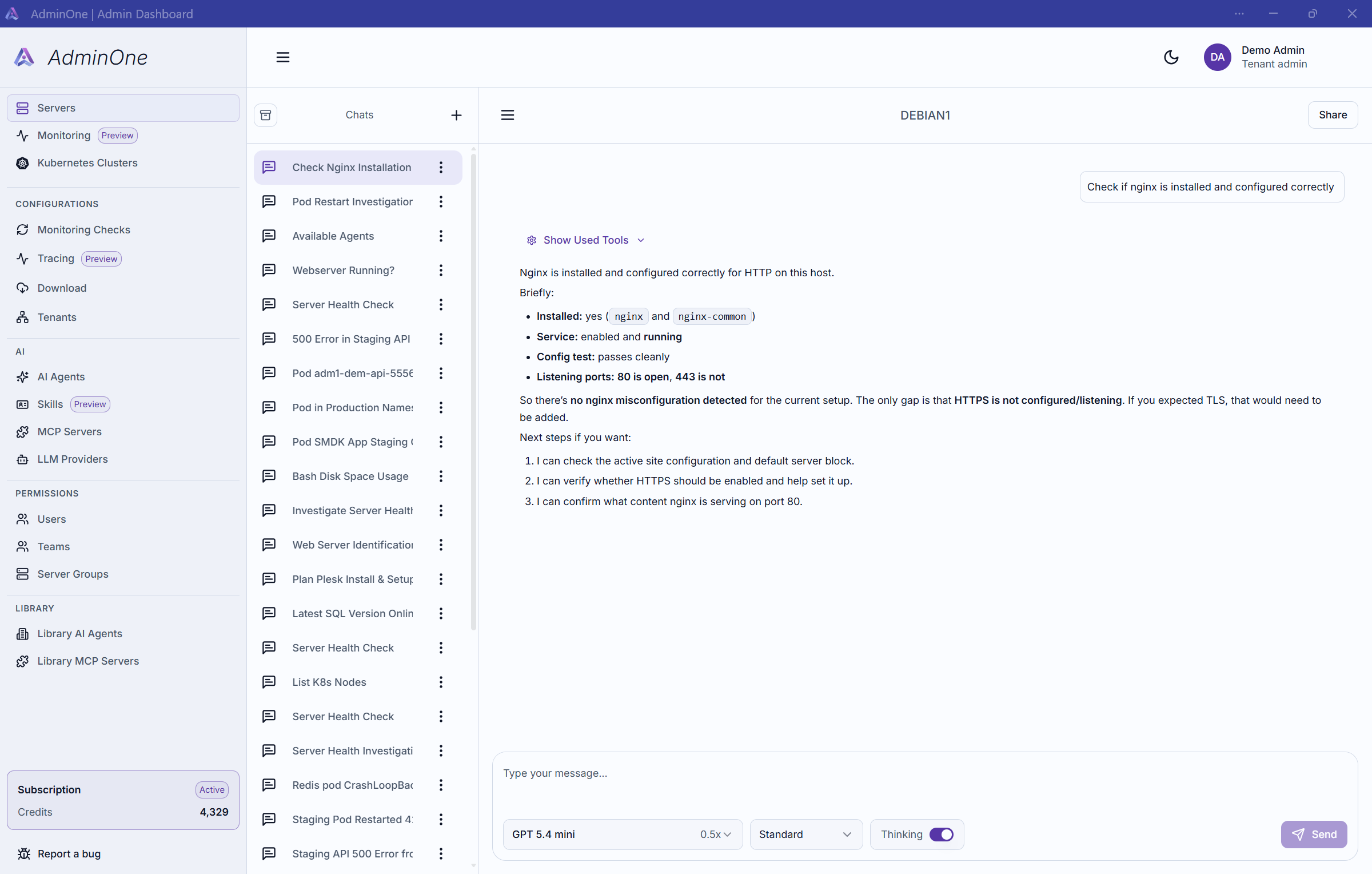
See how AdminOne investigates an incident
Start with a simple operational question. AdminOne routes the work to the right agents, gathers context, explains what it found, and recommends the next step.
Scenarios
Scenarios
Server-01
Ready to see AdminOne in action?
Get the sysadmin help without the job posting
See how AdminOne keeps context, diagnoses incidents, and runs approved fixes in one controlled place.